
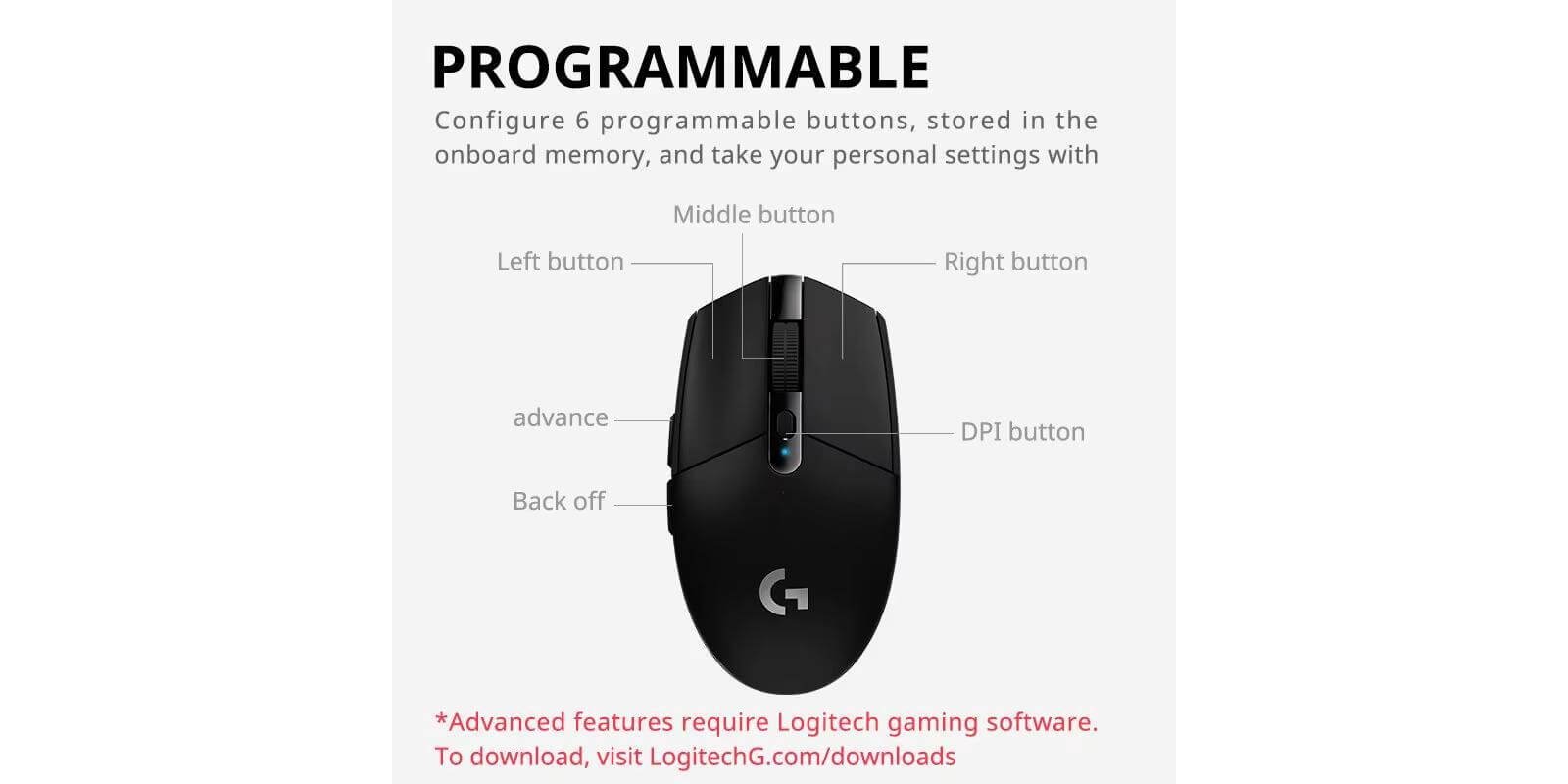

This Logitech G305 review covers a mouse that has been around since 2018, yet in 2026 it still tops best-seller lists and holds roughly 40% of the budget wireless gaming mouse market. That’s rare. In this review we break down exactly why it keeps winning, where it falls short, and who should (and shouldn’t) buy it today.
Quick Verdict (TL;DR)
Buy the Logitech G305 if you want a trusted brand name, a proven wireless connection with genuine 1ms latency, and an incredible 250-hour battery life — all under $35. It’s the safest bet in budget wireless gaming mice.
👉 Check the Logitech G305 price — AliExpress
Skip it if you want a rechargeable battery, RGB lighting, or a polling rate above 1,000Hz. Newer Chinese alternatives offer those extras at a similar price.
Specs at a Glance
| Feature | Logitech G305 |
|---|---|
| Weight | ~99 g (with AA battery) / ~73 g (without) |
| Sensor | Logitech HERO 12K |
| Max DPI | 12,000 |
| Max Tracking Speed | 400 IPS |
| Max Polling Rate | 1,000 Hz (LIGHTSPEED) |
| Battery | 1× AA — up to 250 hours |
| Connectivity | Dual-mode: 2.4 GHz LIGHTSPEED / Wired |
| Bluetooth | ❌ Not available |
| Charging | AA battery (no USB-C charging) |
| RGB | ❌ None |
| Shape | Ergonomic (right-hand) |
| Approx. Price | [INSERT PRICE] |
Design and Build Quality
The G305 is compact, light (without the battery), and built to last. Logitech has been making mice since 1981 and it shows — the plastic shell feels solid, the clicks are crisp, and nothing creaks or flexes. It comes in multiple colors (Black, White, Lilac, Mint, and more depending on your region).
The shape is ergonomic and right-handed, with a slightly raised back that suits claw and fingertip grips well. Users with smaller to medium hands will find it comfortable for long sessions. Those with larger hands may feel cramped.
One honest note: there is no RGB lighting and no premium soft-touch coating. This is a performance-first mouse that skipped the extras to hit a budget price. If aesthetics matter to you, look elsewhere.
The HERO Sensor: Still Competitive in 2026?
The HERO 12K sensor was Logitech’s flagship when launched and it still holds up well. It delivers zero smoothing, zero acceleration, and flawless tracking from 200 to 12,000 DPI. In real-world play — Valorant, CS2, Apex Legends — the cursor tracks exactly where you move it with no spinouts or stuttering.
Is it the most advanced sensor in 2026? No. Competitors now ship PAW3395 and PAW3950 sensors with up to 30,000 DPI and 650+ IPS. But the honest truth is: at the DPI levels most gamers actually use (400–3200), the HERO sensor is indistinguishable from those flagship sensors in everyday play.
LIGHTSPEED Wireless: The Real Selling Point
The single biggest reason to buy this mouse is the LIGHTSPEED wireless connection. Logitech developed this technology for their $150 flagship mice and put it in the G305 — you get genuine 1ms wireless latency that is functionally identical to a wired connection. This was groundbreaking in 2018 and is still excellent in 2026.
In testing, side-by-side comparisons with wired mice showed no perceptible input delay in competitive gaming. The connection is rock-solid with zero dropouts even with active Bluetooth devices and Wi-Fi routers nearby.
Battery Life: The Biggest Advantage
250 hours on a single AA battery. This is where the G305 beats almost every competitor. Most rechargeable wireless gaming mice last 40–150 hours before needing a charge. The G305 lasts months.
Yes, it uses an AA battery instead of built-in USB-C charging — and that divides opinions. The upside: when the battery dies mid-game, you swap in a fresh AA in 10 seconds and keep playing. No waiting for a charge. If you use a lithium AA (like Energizer Ultimate Lithium), the total weight drops from ~99g to around ~85g, making it genuinely competitive with ultralight mice.
What the G305 Is Missing
Being honest here, because your buying decision should be informed:
No Bluetooth. You can only connect via the 2.4GHz dongle or wired. If you want to switch between a PC and a laptop, you’ll need two dongles.
No RGB. There is a single status LED. That’s it.
No rechargeable battery. You buy AA batteries over time. It’s a small ongoing cost but worth knowing.
Heavier than modern ultralights. At ~99g with battery, it’s noticeably heavier than the Attack Shark R3 (46g) or VXE R1 Pro Max (54g). For competitive FPS players who prioritize raw lightness, there are better options today.
Polling rate capped at 1,000Hz. Newer competitors offer 4,000Hz or 8,000Hz. Most gamers won’t feel the difference, but competitive players at the highest level might prefer higher options.
Who Should Buy the Logitech G305?
Buy it if:
- You want a proven, trusted brand with excellent build quality
- Battery life is a priority — 250 hours is genuinely impressive
- You play FPS, MOBA, or general gaming at a casual to competitive level
- You prefer a familiar, comfortable ergonomic shape
- You want the most reliable wireless connection under $35
Skip it if:
- You want the lightest possible mouse for competitive esports
- RGB and aesthetics matter to your setup
- You prefer USB-C charging over disposable batteries
- You want Bluetooth to switch between multiple devices
Logitech G305 vs. The Competition
| G305 | Attack Shark X6 | VXE R1 Pro Max | |
|---|---|---|---|
| Weight | ~99g | ~49g | ~54g |
| Sensor | HERO 12K | PAW3395 | PAW3395 |
| Battery | 250hrs (AA) | 200hrs (built-in) | 150hrs (built-in) |
| Wireless | LIGHTSPEED 1ms | 2.4GHz | 2.4GHz |
| Bluetooth | ❌ | ✅ | ❌ |
| Charging Dock | ❌ | ✅ | ❌ |
| Price | ~$30 | ~$42 | ~$29 |
The G305 wins on battery life, brand trust, and wireless reliability. The newer Chinese alternatives win on weight, sensor specs, and extra features like Bluetooth and charging docks.
Frequently Asked Questions
Is the Logitech G305 good for competitive gaming? Yes. The LIGHTSPEED wireless delivers genuine 1ms latency and the HERO sensor tracks accurately at competitive DPI settings. Many professional and semi-professional players have used it in tournaments.
What is the difference between the G304 and G305? They are the same mouse. The G304 is sold in Asia (China, Japan, etc.) and the G305 is sold in North America and Europe. Same specs, same performance.
How long does the battery last? Logitech claims 250 hours on a single AA battery. Real-world testing confirms this — many users report 2–5 months between battery changes depending on daily use.
Does the G305 have Bluetooth? No. It only connects via the 2.4GHz LIGHTSPEED dongle or wired USB. There is no Bluetooth option.
Is the G305 worth buying in 2026? Yes, for its price. The wireless technology and battery life are genuinely excellent. If you want more modern specs (lighter weight, higher polling rate, Bluetooth), newer alternatives like the Attack Shark X6 or VXE R1 Pro Max are worth comparing.
Logitech G305 Review: Final Verdict
This Logitech G305 review comes down to one thing: the G305 is an eight-year-old mouse that refuses to become irrelevant. Its LIGHTSPEED wireless, 250-hour battery life, and rock-solid build quality make it one of the most reliable gaming mice under $35 in 2026. It’s heavier and less feature-rich than newer Chinese competitors, but it carries something they can’t match yet: years of proven reliability and a brand millions of gamers trust.
If you want the safest, most dependable budget wireless gaming mouse available, the G305 is still the answer.
👉 Check the current price — AliExpress
Disclosure: This article contains affiliate links. If you buy through them, we may earn a small commission at no extra cost to you. This helps support our site.
 English