

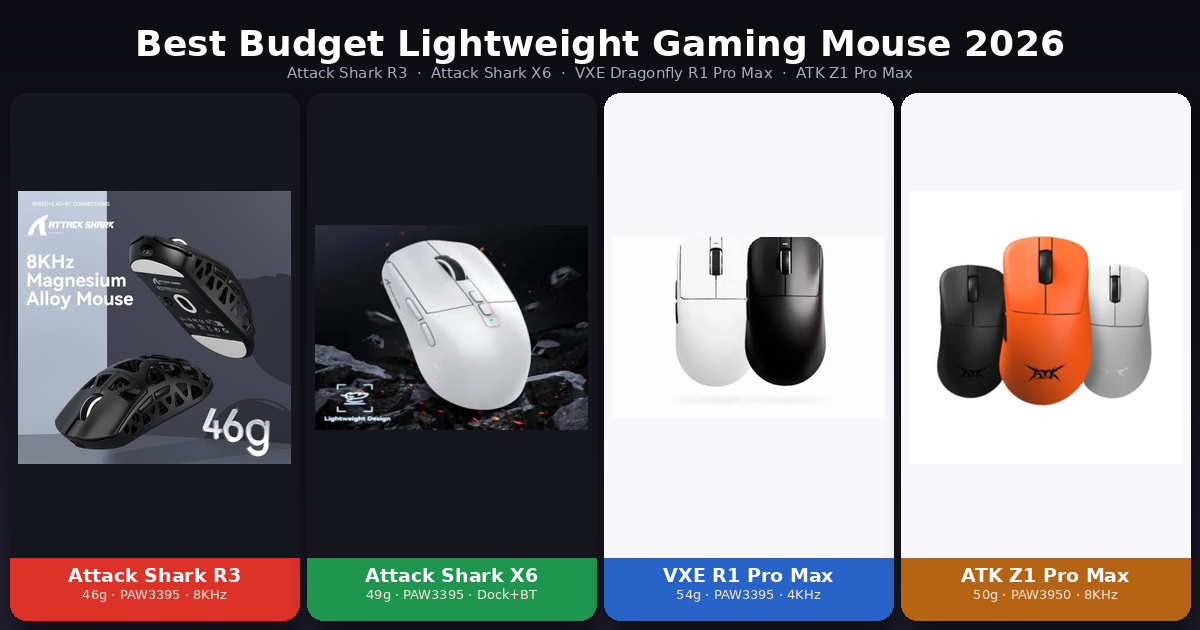
Looking for the best budget lightweight gaming mouse in 2026 without paying flagship prices? You don’t have to. A new wave of affordable wireless mice now ships with the same top-tier sensors, ultra-light shells, and high polling rates that used to cost two or three times as much. In this comparison we put four of the best value picks head to head — the Attack Shark R3, Attack Shark X6, VXE Dragonfly R1 Pro Max, and ATK Z1 Pro Max — so you can find the right one for your grip, your game, and your budget.
Each of these mice wins in a different area, so there’s no single “best” for everyone. Here’s the short version, then the full breakdown.
Quick Verdict (TL;DR)
🏆 Best for competitive / esports — Attack Shark R3. The lightest of the group at around 46 g thanks to a magnesium-alloy shell, with an 8,000 Hz polling rate. If raw speed and minimum weight matter most, this is the one.
Check the Attack Shark R3 price
💎 Best all-around value — Attack Shark X6. The only one here that includes a magnetic charging dock and Bluetooth, with the same flagship PAW3395 sensor. The most complete everyday-plus-gaming package.
Check the Attack Shark X6 price
🎯 Best for high polling on a budget — VXE Dragonfly R1 Pro Max. A 4,000 Hz polling ceiling and a comfortable symmetrical shape, usually at the lowest price of the group.
Check the VXE Dragonfly R1 Pro Max price
⚡ Best sensor / pure performance — ATK Z1 Pro Max. The most advanced sensor here (PixArt PAW3950, up to 30,000 DPI) with an 8,000 Hz polling rate, built for serious competitive players.
Check the ATK Z1 Pro Max price
Specs at a Glance
| Feature | Attack Shark R3 | Attack Shark X6 | VXE Dragonfly R1 Pro Max | ATK Z1 Pro Max |
|---|---|---|---|---|
| Weight | ~46 g | ~49 g | ~54 g | ~50 g |
| Sensor | PixArt PAW3395 | PixArt PAW3395 | PixArt PAW3395 | PixArt PAW3950 |
| Max DPI | 26,000 | 26,000 | 26,000 | 30,000 |
| Max Polling Rate | 8,000 Hz | 1,000 Hz | 4,000 Hz (dongle sold separately) | 8,000 Hz |
| Connectivity | Tri-mode (2.4G / BT / Wired) | Tri-mode (2.4G / BT / Wired) | Dual-mode (2.4G / Wired) | Dual-mode (2.4G / BT) |
| Charging Dock | ❌ | ✅ Magnetic RGB | ❌ | ❌ |
| Build | Magnesium alloy | Plastic | Plastic | Plastic |
| Best Grip | Ergonomic (right-hand) | Ergonomic (right-hand) | Symmetrical / ambidextrous | Ergonomic (right-hand) |
| Approx. Price | $49 | $42.34 | $28.74 | $55.49 |
Weight and Build Quality
Weight is the first thing competitive players look at, and the Attack Shark R3 wins outright at around 46 g. What makes that impressive is the material: instead of a hollow plastic honeycomb, the R3 uses a magnesium-alloy shell, so it stays both ultra-light and rigid. That’s a premium trick at a budget price.
The ATK Z1 Pro Max and Attack Shark X6 sit close behind at around 50 g and 49 g, both light enough for fast flicks. The VXE Dragonfly R1 Pro Max is the heaviest at roughly 54 g — still light by normal standards, but you’ll feel the difference next to the R3.
Shape matters too. The R3, X6, and ATK Z1 all use right-handed ergonomic shells that support palm and claw grips, while the VXE R1 Pro Max is symmetrical and ambidextrous, which fingertip and claw grippers tend to prefer.
Sensor and Tracking Performance
Three of these four mice share the PixArt PAW3395, one of the most trusted sensors in gaming — delivering up to 26,000 DPI with flawless tracking. In real-world play, the R3, X6, and VXE R1 Pro Max are effectively tied on pure accuracy.
The ATK Z1 Pro Max steps up to the newer PixArt PAW3950, pushing DPI to 30,000 and adding a touch more headroom for the most demanding setups. In practice you won’t feel a huge gap versus the PAW3395 — both are excellent — but on paper the Z1 has the most advanced sensor of the group, which is why it’s the pick for players who want the best of everything.
Polling Rate: Speed and Responsiveness
This is where the four really separate. Polling rate is how often the mouse reports its position to your PC, and higher numbers can mean slightly lower input lag for competitive play.
- Attack Shark R3 and ATK Z1 Pro Max: up to 8,000 Hz — the highest here, ideal for serious FPS players.
- VXE Dragonfly R1 Pro Max: up to 4,000 Hz — a great middle ground, though the 4K receiver is usually sold separately, so factor that in.
- Attack Shark X6: 1,000 Hz — perfectly smooth for the vast majority of gamers, even if it’s not chasing the competitive ceiling.
Honest take: 1,000 Hz already feels great, and most players won’t notice the jump to 4K or 8K. But if you play competitively and want every advantage, the R3 or ATK Z1 give you the most.
Connectivity and Extra Features
The Attack Shark X6 is the most versatile, with full tri-mode connectivity (2.4 GHz, Bluetooth, and wired) plus a magnetic RGB charging dock — drop it on the base between sessions and it’s always charged. That Bluetooth option also makes it handy for a laptop or tablet. The Attack Shark R3 is also tri-mode, so it pairs gaming performance with everyday flexibility.
The VXE R1 Pro Max is dual-mode (2.4 GHz and wired), skipping Bluetooth to focus on low-latency gaming, while the ATK Z1 Pro Max offers 2.4 GHz plus Bluetooth for multi-device pairing. None of these three include a charging dock, which is part of what makes the X6 stand out for value.
Price and Value
All four are aggressively priced for the performance they offer, which is exactly why they’ve become so popular. Prices on AliExpress move with sales and coupons, so always check the live price before buying.
Attack Shark R3 :$49
Attack Shark X6 : $42.34
VXE Dragonfly R1 Pro Max :$28.74
ATK Z1 Pro Max : $55.49
The VXE R1 Pro Max is often the cheapest entry into flagship-sensor performance, while the X6 justifies a small premium with its dock and Bluetooth. The R3 and ATK Z1 cost a little more but deliver the lightest weight and the best sensor respectively.
Which One Should You Buy?
- Choose the Attack Shark R3 if you’re a competitive player who wants the lightest possible mouse with a premium magnesium build and 8K polling.
- Choose the Attack Shark X6 if you want the most complete all-rounder — a charging dock, Bluetooth, and a great sensor for both work and play.
- Choose the VXE Dragonfly R1 Pro Max if you want a symmetrical shape and 4K polling at the lowest price.
- Choose the ATK Z1 Pro Max if you want the most advanced sensor and top-tier performance above all else.
Frequently Asked Questions
Which of these is the lightest gaming mouse? The Attack Shark R3 at around 46 g, thanks to its magnesium-alloy shell.
Do I really need 8,000 Hz polling? No. 1,000 Hz already feels smooth for almost everyone. The 4,000 Hz and 8,000 Hz options mainly benefit competitive FPS players chasing the lowest possible input lag.
Which mouse has the best sensor? The ATK Z1 Pro Max uses the newer PixArt PAW3950 (up to 30,000 DPI), while the other three use the excellent PixArt PAW3395 (up to 26,000 DPI).
Which one has Bluetooth and a charging dock? The Attack Shark X6 is the only one of the four with both Bluetooth and a magnetic charging dock.
Are these mice good for the price? Yes. All four deliver flagship-level sensors and lightweight designs at budget prices, which is why they’ve become popular alternatives to far more expensive brands.
Final Verdict: The Best Budget Lightweight Gaming Mouse for You
There’s no single winner here — and that’s good news, because it means you can match the mouse to how you actually play. For pure competitive performance and the lowest weight, the Attack Shark R3 leads. For the most features and everyday value, the Attack Shark X6 is the smart all-rounder. For high polling at the lowest price, the VXE Dragonfly R1 Pro Max delivers. And for the most advanced sensor, the ATK Z1 Pro Max is the performance pick.
Whichever you choose, check the live prices below before buying — a coupon can easily swing the decision.
- Attack Shark R3
- Attack Shark X6
- VXE Dragonfly R1 Pro Max
- ATK Z1 Pro Max
Disclosure: This article contains affiliate links. If you buy through them, we may earn a small commission at no extra cost to you. This helps support our site.
 English