

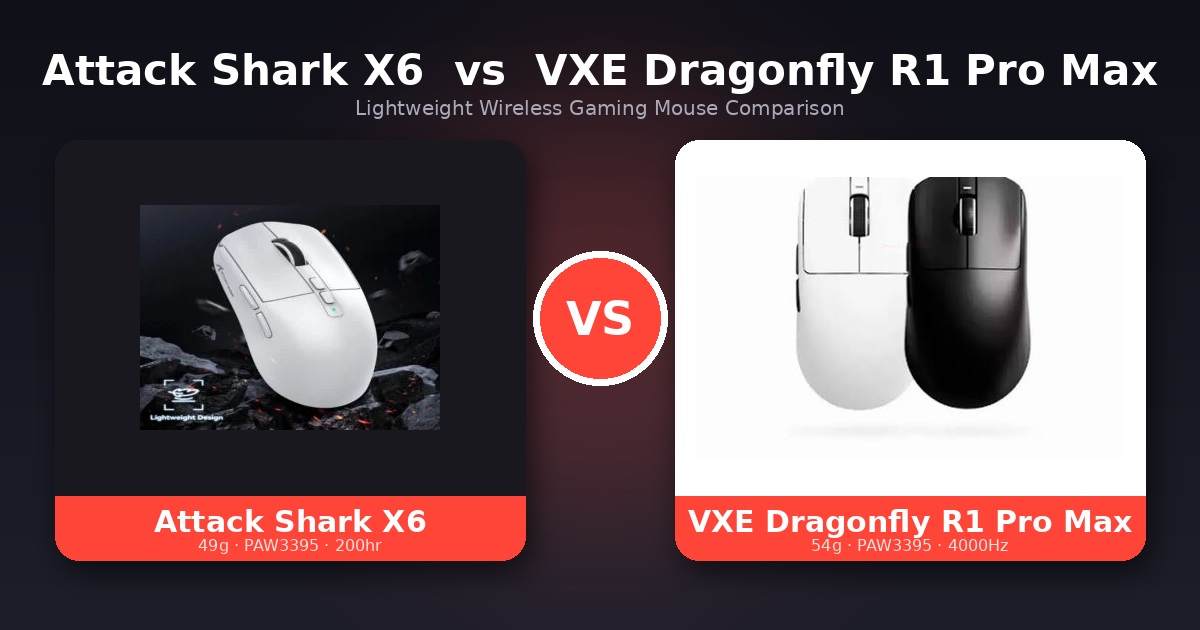
In this Attack Shark X6 vs VXE Dragonfly R1 Pro Max comparison, we put two of 2026’s most popular budget lightweight gaming mice head to head. Both are built around the same flagship sensor — yet they target two slightly different types of players. One leans into all-around convenience and value; the other chases competitive responsiveness. If you’re stuck between them, this side-by-side breakdown will help you pick the right one in a couple of minutes.
Quick Verdict (TL;DR)
Buy the Attack Shark X6 if you want the lightest mouse, an included magnetic charging dock, Bluetooth for switching between devices, the longest battery life, and a comfortable ergonomic shape. It’s the most complete all-rounder for most people.
➡️ Check the Attack Shark X6 price
Buy the VXE Dragonfly R1 Pro Max if you’re a competitive FPS player who wants the higher 4,000 Hz polling-rate ceiling, prefers a symmetrical ambidextrous shape, and likes a smooth “ice-feel” coating.
➡️ Check the VXE Dragonfly R1 Pro Max price
Specs at a Glance
| Feature | Attack Shark X6 | VXE Dragonfly R1 Pro Max |
|---|---|---|
| Weight | ~49 g | ~54 g |
| Sensor | PixArt PAW3395 | PixArt PAW3395 |
| Max DPI | 26,000 | 26,000 |
| Max Tracking Speed | 650 IPS | 650 IPS |
| Max Polling Rate | 1,000 Hz | 4,000 Hz (4K dongle sold separately) |
| Battery Life | Up to 200 hrs | Up to 150 hrs (at 1,000 Hz) |
| Connectivity | Tri-mode: USB-C / 2.4 GHz / Bluetooth 5.2 | Dual-mode: 2.4 GHz / Wired |
| Charging Dock | ✅ Included (magnetic RGB) | ❌ Not included |
| Shape | Ergonomic | Symmetrical / ambidextrous |
| Coating | Standard | Ice-feel coating |
| Switches | Huano / Kailh (80M clicks) | Kailh |
| Approx. Price | $42.34 | $28.74 |
Design and Weight
The headline difference here is weight. The Attack Shark X6 comes in at around 49 grams, while the VXE Dragonfly R1 Pro Max sits at roughly 54 grams. Five grams may not sound like much, but flick-shot players and anyone with smaller hands will notice the X6 feeling slightly nimbler during fast movements.
Shape is the other key distinction. The X6 uses an ergonomic shell that fills the palm and naturally favors right-handed palm and claw grips. The R1 Pro Max uses a symmetrical, ambidextrous shape, which suits fingertip and claw grippers and works for both hands. Neither is “better” — it comes down to how you hold your mouse.
Sensor and Tracking Performance
This is where the two are essentially tied. Both mice run the PixArt PAW3395, one of the most respected sensors in the budget-to-mid gaming space. That means both deliver up to 26,000 DPI, a 650 IPS tracking speed, and 50 G acceleration. In real-world play, you will not feel a meaningful tracking difference between them — pixel-perfect aim is on the table either way.
In short: if raw sensor accuracy is your only concern, this round is a draw.
Polling Rate: The Real Performance Gap
Here’s the most important technical difference. The Attack Shark X6 tops out at 1,000 Hz, which is perfectly smooth for the vast majority of gamers. The VXE Dragonfly R1 Pro Max can reach 4,000 Hz — a higher polling-rate ceiling that reduces input latency further and can give competitive FPS players a slightly crisper, more responsive feel.
One honest caveat: the 4K polling rate requires a separate 4,000 Hz receiver that is sold separately, so factor that extra cost in if it’s the reason you’re leaning toward the VXE. If you’re a casual or even most enthusiast gamers, 1,000 Hz is more than enough and you won’t feel held back by the X6.
Battery Life
The Attack Shark X6 wins here, rated for up to 200 hours versus up to 150 hours on the R1 Pro Max (both at 1,000 Hz). Equally important, the X6 ships with a magnetic RGB charging dock — you simply drop the mouse on the base between sessions and it’s always topped up. The VXE relies on cable charging, which is fine but less effortless.
Connectivity
The X6 is more flexible with three connection modes: wired USB-C, 2.4 GHz wireless, and Bluetooth 5.2. That Bluetooth option is genuinely useful if you also want to pair the mouse with a laptop or tablet for everyday work.
The R1 Pro Max is dual-mode only — 2.4 GHz wireless and wired. It skips Bluetooth in favor of focusing on low-latency gaming performance through its 2.4 GHz connection. For a pure gaming rig that’s no loss; for a do-everything mouse, the X6’s Bluetooth is a plus.
Build Quality and Coating
The R1 Pro Max’s standout feel is its “ice-feel” coating — a smooth, slightly cool surface that many users love for grip and comfort during long sessions. The X6 uses a more standard finish but counters with its lighter weight and that bundled dock. Both use durable switch sets rated for tens of millions of clicks.
Price and Value
At these prices, the VXE Dragonfly R1 Pro Max is actually the cheaper way into flagship PAW3395 performance and it even adds the 4,000 Hz polling option. The Attack Shark X6 costs a bit more, but that premium buys real extras: the magnetic charging dock, Bluetooth, a lighter shell, and longer battery. So the VXE is the better pure-price pick, while the X6 is worth the extra if you want the most complete all-round package.
- Attack Shark X6: $42.34
- VXE Dragonfly R1 Pro Max: $28.74
Either way, both are superb value at this price just check the live AliExpress price before buying, since coupons change often.
Which One Should You Buy?
Choose the Attack Shark X6 if you want the best all-around package: the lightest weight, a free charging dock, Bluetooth multi-device support, the longest battery, and a comfortable ergonomic shape. It’s the easy recommendation for most gamers who want the most complete package.
Choose the VXE Dragonfly R1 Pro Max if you’re specifically a competitive player who wants the 4,000 Hz polling ceiling, prefers a symmetrical ambidextrous shape, and values the ice-feel coating — and you don’t mind buying the 4K dongle separately.
🏆 Best for most people: Attack Shark X6
competitive FPS: VXE Dragonfly R1 Pro Max
Frequently Asked Questions
Do the Attack Shark X6 and VXE R1 Pro Max use the same sensor? Yes. Both use the PixArt PAW3395 flagship sensor with up to 26,000 DPI, so their tracking performance is virtually identical.
Is the higher polling rate on the VXE worth it? For competitive FPS players who want every millisecond of responsiveness, the 4,000 Hz ceiling is a nice edge — but it requires a separately sold 4K receiver, and most gamers are perfectly served by the X6’s 1,000 Hz.
Which mouse is lighter? The Attack Shark X6 at around 49 g is lighter than the VXE Dragonfly R1 Pro Max at around 54 g.
Does either mouse have Bluetooth? Only the Attack Shark X6 offers Bluetooth (5.2). The VXE R1 Pro Max is limited to 2.4 GHz wireless and wired.
Which has better battery life? The Attack Shark X6, rated up to 200 hours, plus it includes a magnetic charging dock for effortless top-ups.
Attack Shark X6 vs VXE Dragonfly R1 Pro Max: Final Verdict
These are two of the best-value lightweight wireless mice you can buy right now, and you genuinely can’t go wrong with either. They share the same excellent sensor, so the decision comes down to priorities: pick the Attack Shark X6 for the lighter weight, charging dock, Bluetooth, and overall value, or the VXE Dragonfly R1 Pro Max for the higher polling rate and symmetrical shape if you’re chasing competitive performance.
Whichever you choose, check the live prices below before you buy — sales and coupons can make a real difference.
Attack Shark X6
VXE Dragonfly R1 Pro Max
 English